Daily planner
A daily planner you can open and trust
Open Aura in the morning and Today shows what's next, what's due and what you jotted down. Then put your tasks onto a timeline so the plan is something you can follow.
Free, no card. Updated 22 November 2026.
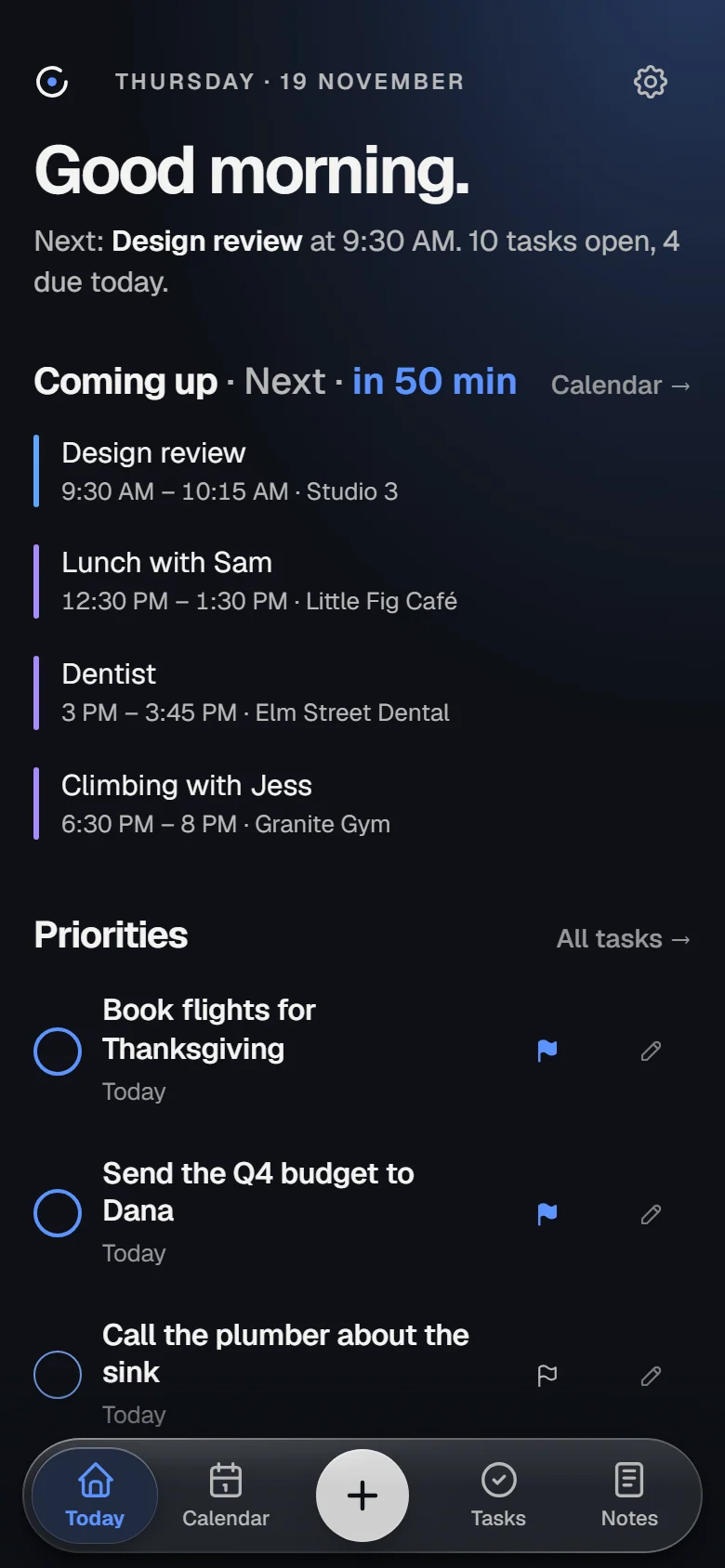
Start with Today
The Today screen puts three things in one place: what's next on your calendar, what's due, and what you've jotted down, with a gentle count of how long until your next event. There's no dashboard to set up. The most important tasks are at the top, so the first thing you see is the first thing to do.
Turn the list into a plan
A list says what; a plan says when. In the Calendar, switch to Day and tap to plan. Your unscheduled tasks appear, and you can:
- Drag a task onto a time, or
- Tap the task and then tap a time.
It becomes a block on your day, right beside your meetings, so you can see what's actually free. This is the method called time blocking. If you want the full method, step by step, read how to plan your day.
Tasks that follow you
Tasks you don't finish don't vanish. Aura nudges you to move them forward and asks whether they need a due date, instead of leaving them to pile up as overdue. A new task is for today unless you pick another day, so nothing lands in a pile you never open.
Plan by talking
If your hands are full, say it: "Remind me to pay rent on Friday", "Dentist Tuesday at 3", "Move lunch with Sam to 1". Aura shows you each change to approve first. See voice to-do list.
Work the plan
When a block starts, open the task and tap Focus. A timer sits above the tabs, with optional breaks. See focus timer.
What it doesn't do (yet)
- It doesn't plan your day for you. Aura proposes and you approve, and you place the blocks. That's a choice: some people want an app that rearranges their day automatically, and Aura is for people who want to stay in charge.
- Notifications only fire while Aura is open.
- Aura is built around one person's day, not a team's.
FAQ
How is this different from a to-do list?
A to-do list has no sense of time. Aura's planner puts the tasks on the same timeline as your events, so you can tell whether the day adds up.
Is it free?
Yes, with no card, and there's no paid plan today.
Does it work offline?
The app opens without a connection. Your synced calendar, AI features and voice recognition need one, and Aura tells you plainly when you're offline.
Can I use it on my phone and laptop?
Yes, with one account on every device. On a phone, add the site to your home screen.
Read more
How to Plan Your Day: A 7-Step Method That Survives Real Life
A step-by-step way to plan your day: empty your head, place fixed commitments first, pick a few priorities, add buffer time, and review. Works in any app.
The Weekly Review: A 15-Minute Checklist to Stay on Top of Everything
A weekly review in six steps: collect loose ends, look back and ahead, clean your task list, pick next week's priorities. With a checklist to copy.
Calendar and To-Do List in One Place: 3 Ways to Set It Up
Why a calendar and to-do list work better together, and three ways to combine them: Google Tasks, a task app with a calendar view, or one app for both.