05:00  /  the day before you've said anything

Talk.
It's handled.

One sentence, and the day arranges itself.

Way one

Say it.

The mic is on every screen — the floating button, the quick-add bars, the assistant. You never have to be in the right place to add the right thing.

“Remind me to pay rent Friday at 3pm”

Sets a task and a 3pm alert. Runs on the offline parser — no API key involved.

Listening

Way two

Snap it.

Photograph a whiteboard, a syllabus, a printed schedule or your own handwriting. Aura opens its own camera — live viewfinder, framing guide, front/back switch — not the OS picker.

The exam becomes an event. The homework becomes three tasks. The page becomes a note.

Capture is the one part that needs an AI key — reading an image takes a vision model.

Reading

Way three

Type it.

Same sentence, same parser, no microphone. Voice input needs Chrome, Edge or Safari on iOS — everywhere else you type, and nothing is lost.

“Schedule the conference all day tomorrow”

One shared brain behind all three routes in.

Parsing

Your day  /  assembled from things you said

Thursday,
31 July

Every row below arrived a different way — spoken on a walk, read off a photo, typed in a hurry. They land in one place, in order, and the day is just there when you look at it.

08:30 StandupWork · 15 minutes
10:00 DentistElm StreetTyped
13:00 Lunch with SamBooked from the pavement outside Spoken
15:00 Pay rentTask · alert fires at 15:00 Spoken
16:30 English examRoom 2B Read from a photo
All day ConferenceRuns through Saturday

The app  /  four tabs

Four tabs.
One thing listening.

Each works on its own. One + in the middle reaches all of them — talk, type, or hand it a photo.

Thursday
31 July
08:30 StandupWork
10:00 DentistElm Street
13:00 Lunch with SamAdded by voice
16:30 English examFrom a photo
All day ConferenceTo Saturday
Cal
Tasks
Notes
Ask
Tasks
4 left today
Overdue
Send the depositYesterday 17:00 · 1 file
Today
Pay rentReminder 15:00
Write the essayFrom the whiteboard
Buy coffeeAdded by voice
Done
Book the dentist
Cal
Tasks
Notes
Ask
Notes
Worth keeping
HOTEL ROOM
412
Meridian · late checkout asked for
WI-FI
MER-guest · sunrise-2026
PASSPORT
Expires March 2031 · renewal takes six weeks
FROM A PHOTO
Thursday's whiteboard, transcribed, image attached
Cal
Tasks
Notes
Ask
Assistant
Talk or type
What's on today, and did I ever book the dentist?
Five things. Standup at 8:30, dentist at 10 — yes, you booked it Monday — lunch with Sam at 1, and the exam at 4:30.
Move lunch to 2 and remind me to pay rent at 3.
Done. Lunch → 14:00 Alert 15:00
Cal
Tasks
Notes
Ask

Capture  /  a photo becomes a plan

The board on Thursday,
and what came back.

One photo

Aura's own camera, not the OS picker: live viewfinder, framing guide, front and back.

EventEnglish examThursday · 16:30 · Room 2B
TaskWrite the essayDue Wednesday · high priority
TaskRead pages 15–16Due Tuesday
NoteWhiteboard, 31 JulyTranscribed · photo attached

Nothing is saved until you say so.

Every title, date, time and priority stays editable and anything can be unchecked. The model reads the photo. You approve the calendar.

The assistant  /  with or without a model

It doesn't reply.
It does.

No key

Works out of the box

A fast offline rules parser handles the everyday phrasings with no API key at all — free, private, instant, and it never fails because the network did.

Your key

Or bring a model

Claude, ChatGPT, Gemini or Groq — whichever you already pay for. Paste it in Setup and it's live immediately. Groq is the cheap way in. That's what unlocks free conversation and Capture.

Either way

The network can fail. The app can't.

If the key is missing or the request drops, Aura returns to the offline parser without saying a word about it.

Make it yours  /  the whole page will change

Night or daylight.
Try it here.

Aura ships three colour versions, three colour modes and independent light and dark. Flip this page between night and daylight to see how the same system behaves.

Eight category hues colour-code your calendars and task groups. In mono mode they all collapse to grey — colour is never the only thing carrying meaning.

The product  /  real screens

Not mockups.
Screenshots.

Taken from the app as it runs today — phone and desktop, light and dark.
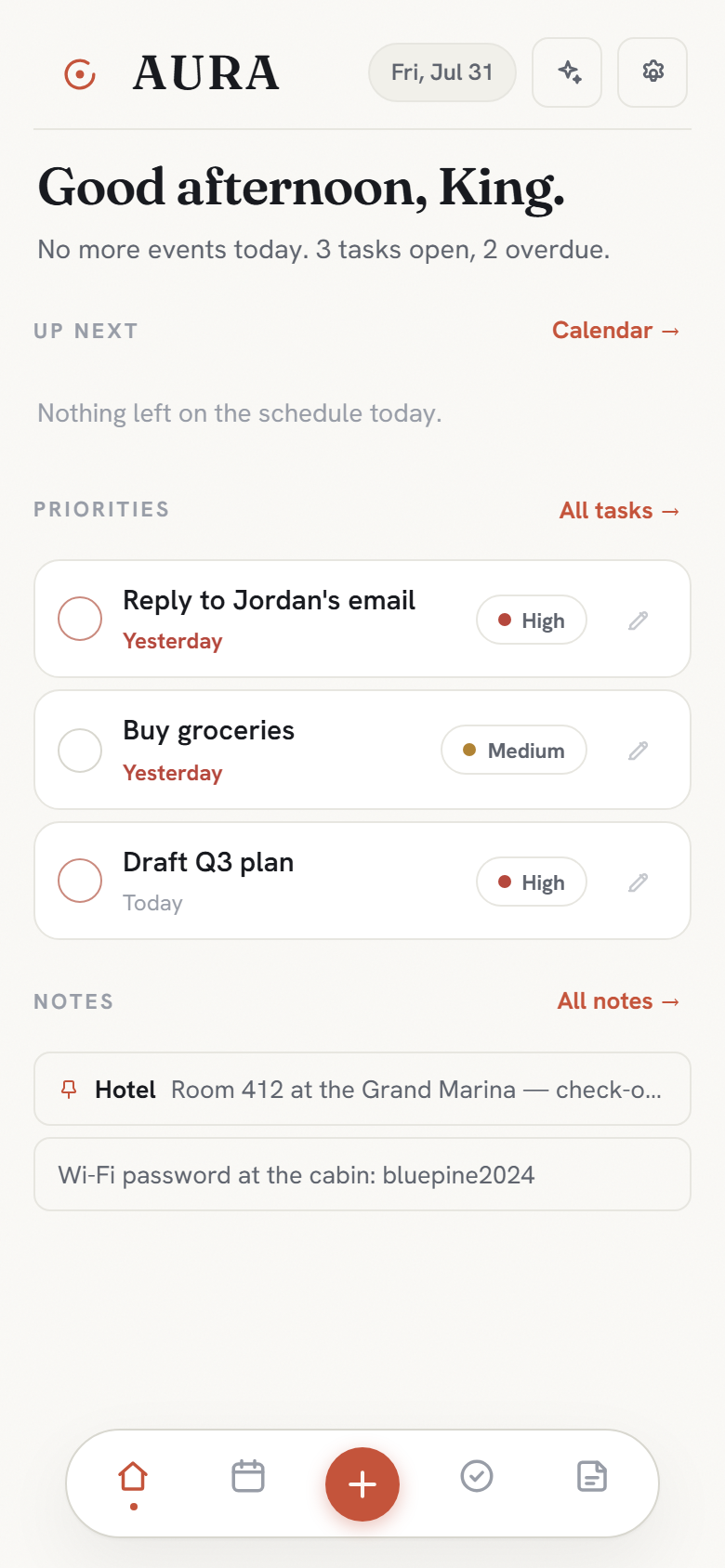
Aura on a phone: the Today dashboard with up-next events, ranked priorities and pinned notes
Today — your whole day on one screen.
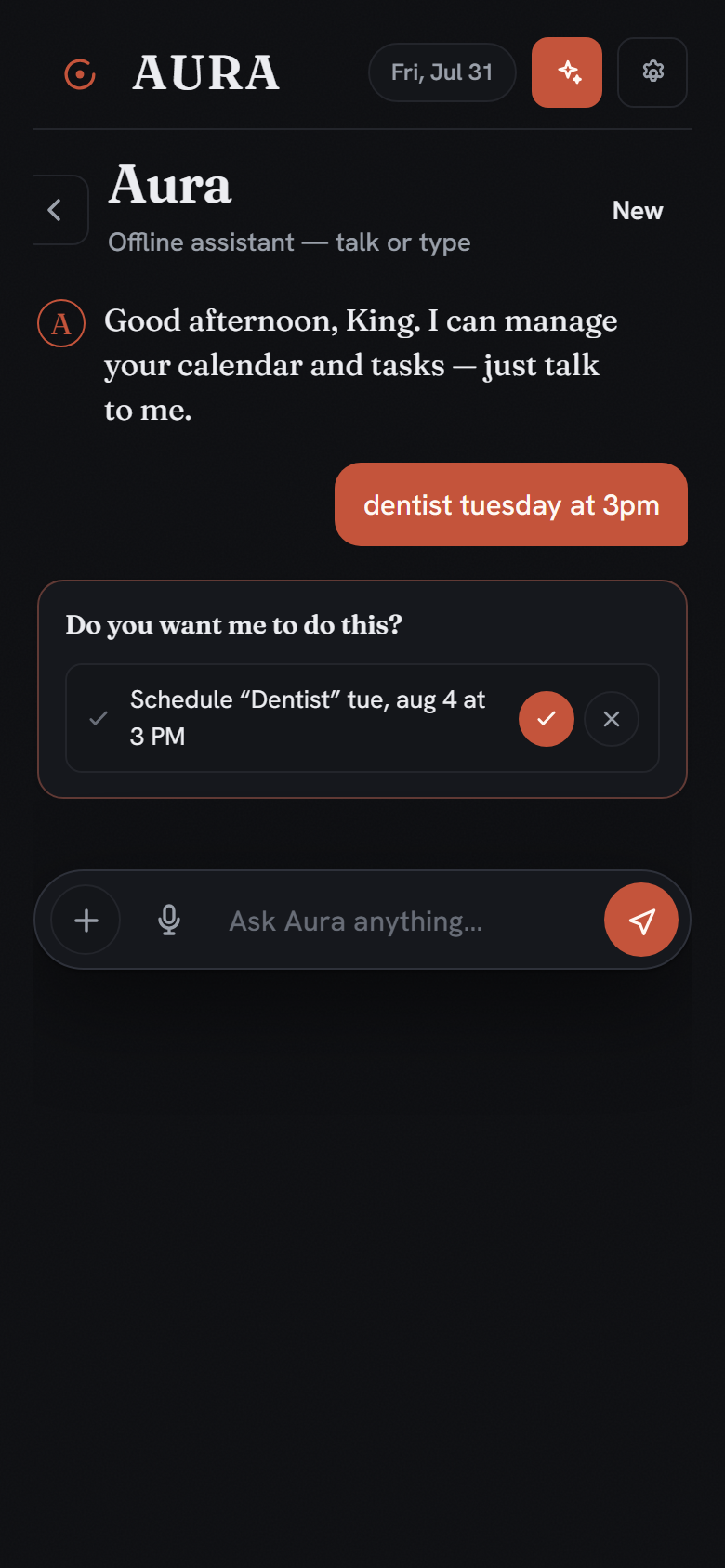
Aura's chat proposing 'Schedule Dentist, Tuesday at 3 PM' with approve and discard buttons
Say it — Aura proposes, you approve. Nothing saves itself.
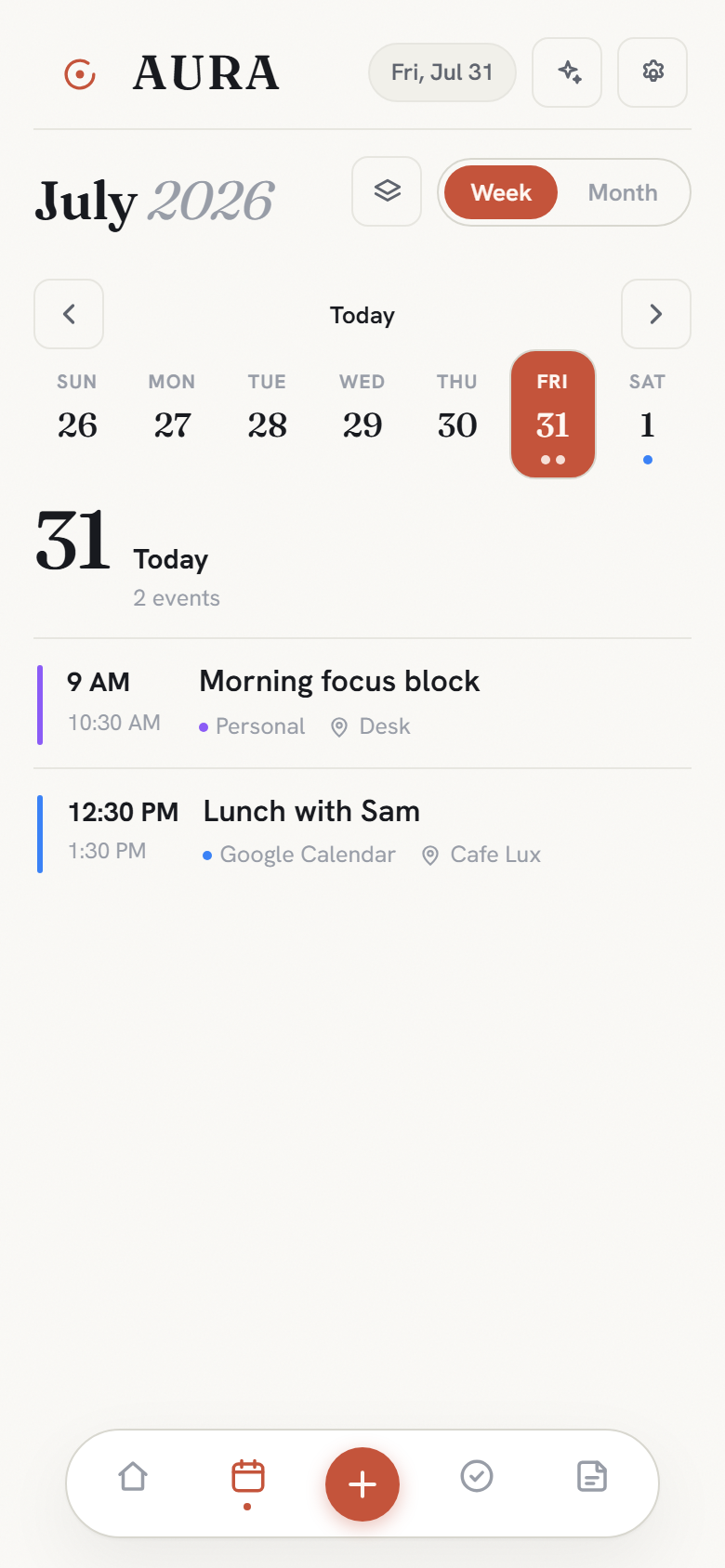
Aura's calendar on a phone: week strip and day agenda
The calendar — week strip, day agenda, month grid.
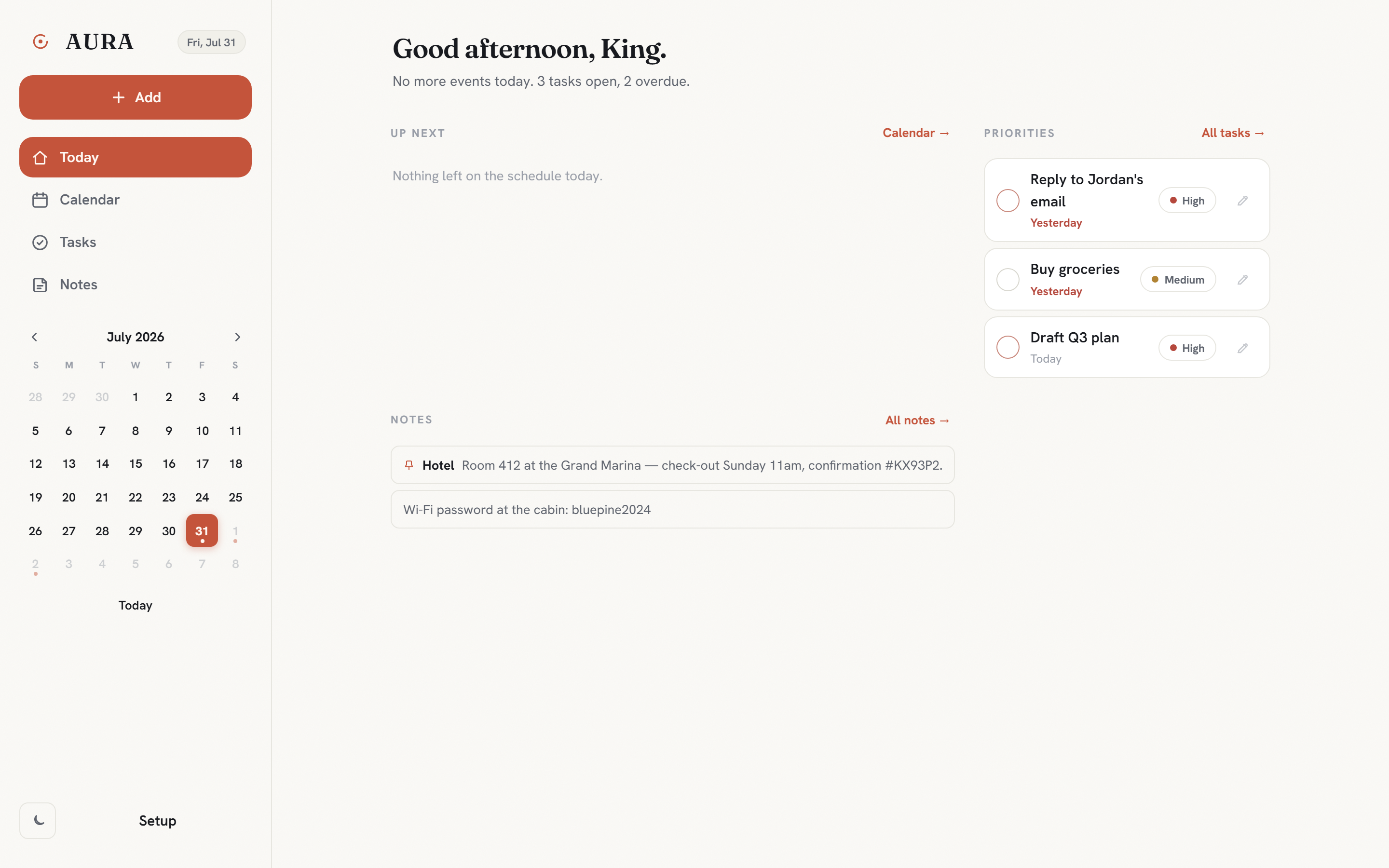
Aura on desktop: sidebar with mini-month, two-column dashboard
On a desk it opens out — sidebar, mini-month, the day in two columns. Same account, same data, live on every device.

You already know what your day looks like.
Say it out loud.

Aura is live. A free account — email or Google — puts your calendar, tasks and notes on every device you own, in sync.

Free, in the browser — add it to your phone’s home screen. Prefer to self-host? The whole install:

terminal
$ npm install
$ npm run dev
➜ Local: http://localhost:5173/

Questions.

Do I need an account?
Yes — a free one, with your email and a password or one tap of “Continue with Google.” The account is what keeps your calendar identical on every device. Sign out or delete the account — and everything in it — any time from Setup.
Does it sync with Google Calendar yet?
Not yet — and we’d rather say so than imply otherwise. Two-way sync with Google and Apple calendars is the next phase; every event and task already carries a source and external ID so records can match back cleanly when it lands. What works today: your own devices stay in sync through your account — add something on your phone and it’s on your laptop before you look up.
Which browsers does voice input work in?
It uses the browser's built-in Web Speech API — best supported in Chrome and Edge, and working in Safari on iOS. Everywhere else you type the same phrases into the same parser.
Do I need to pay for an AI key?
Not to use Aura. The offline parser handles the common phrasings with no key and no network. A key buys two things: free-form conversation with the assistant, and Capture — reading a photo needs a vision model. Any provider works, and that provider bills you directly.
What happens if the network drops?
The app keeps working — data is persisted locally and the offline parser handles commands. Two honest caveats: there's no service worker yet, so the page itself still has to load from the server the first time, and Capture and voice recognition both need the network.
Where do my files and keys actually live?
Events, tasks, calendars and notes live in your account’s database, which is what lets every device see the same day. Capture photos and attachments stay in the browser’s own storage on the device that made them. AI keys stay on the device where you pasted them — sent only with your own requests, never stored server-side.
Is there a phone app?
It’s a web app that behaves like one: open my-aura.pages.dev on your phone, add it to your home screen, and it’s a full-screen app with bottom tabs and a full-screen chat. On a desktop the same account opens out into a sidebar, a mini-month day picker and a two-column day.